Deploying a custom relay server
✨ Use coturn as a relay server between two LAN.
Deploy your own coturn relay server to ensure reliable connectivity between Vitres across different networks, especially in restrictive environments.⚠️ This is an advanced configuration that should only be performed by authorized IT technicians.
Coturn Introduction
Coturn is an opensource relay server available on the internet. It supports TURN protocol and allows to route traffic between two Vitres that are not directly reachable between them. The STUN protocol will be used to find the different endpoints where a Vitre can be tried to be reached.
The Vitres will try to connect directly to each others but in case of failure, each of them will open a connection to the relay serveur and the encrypted data packets will be sent throw this relay.
Coturn deployment
Here I will illustrate a docker deployment based on a server accessible on the internet. It's a machine running on linux with docker engine ready to use.
First we need a local folder where we will save the configuration and the user database. Here we will use sqlite database has we won't have many users.
# create a coturn folder

mkdir coturn

# gives ownership to the user that is running coturn inside the container.

chown -R 65534:65534 coturn
Now you can create a coturn.conf with the following content:
db=/var/lib/coturn/turndb # we are using the sqlite database

It-cred-mech #users and credentials authentication

fingerprint # send TURN fingerprints

realm=mydomain.com # default realm used for authenticating users
Next we can start the docker process. Basically it will download the docker image coturn v4.6.2, will start it as a always on daemon. It will detect the IP address where it can be reached and will read the configuration from a shared volume coturn.
docker run -d --name coturn--network-host--restart always \
-e DETECT_EXTERNAL_IP=yes \
-e DETECT_RELAY_IP=yes \
-v $(pwd)/coturn:/var/lib/coturn \
coturn/coturn:4.6.2 \
-c /var/lib/coturn/coturn.conf
If you want to see what is happening, you can add an extra --log-file=stdout at the end of the command line and inspect the container log docker logs coturn.
To allow a connection to the TURN server, we need to add a user inside the database. To do so, the container is embedding the turnadmin tool. We can tell to docker to run this tool to add a user. Here we are targeting the sqlite db, adding a user myuser with pass1234 as password. This user needs to be in the same realm as defined in the coturn configuration file.
docker exec coturn turnadmin -b /var/lib/coturn/turndb -a -u myuser -r mydomain.com -p pass1234
You can list the existing users in the database by running
docker exec coturn turnadmin -b /var/lib/coturn/turndb -l
Testing STUN / TURN server
To test your server you can go on this page Trickle ICE.
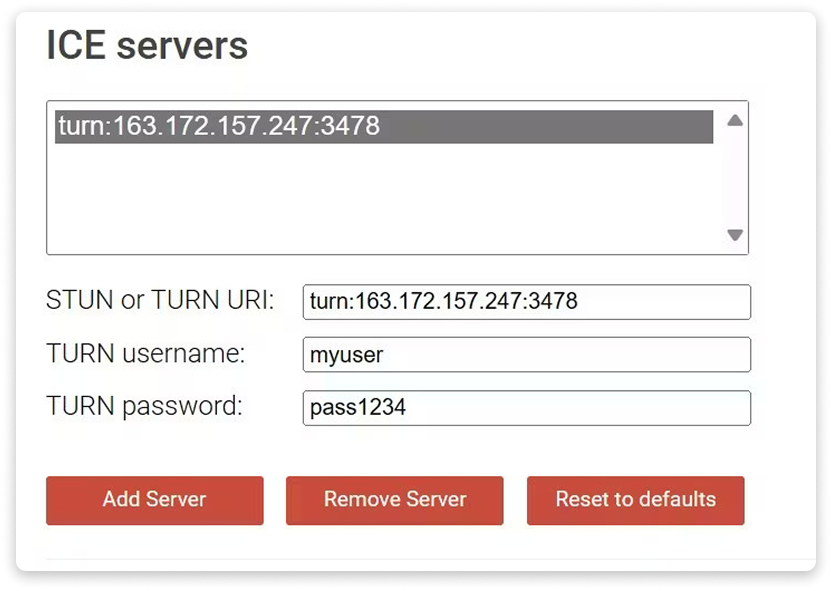
Add your user information in the input fields and the server uri and click on "Add Server".
The server URI looks like : turn:163.172.157.247:3478, You can replace the IP of your server by FQDN if you have a DNS entry configured. ex: turn:myrelay.mydomain.com:3478
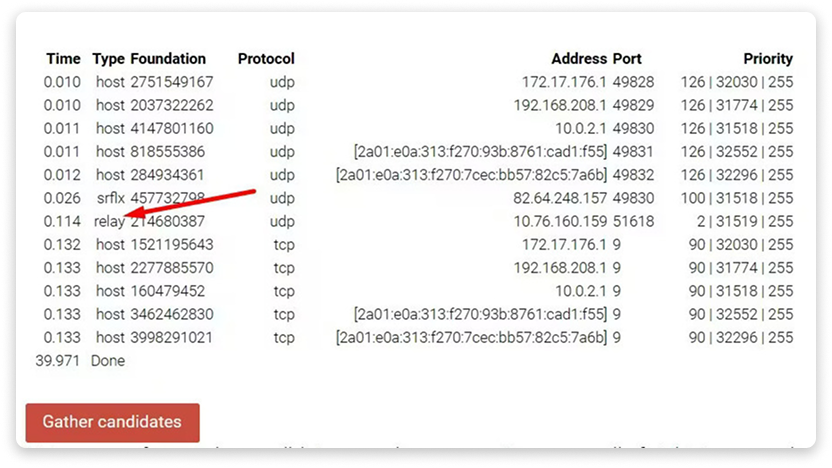
Then you can click on "Gather candidates" and you will see the discoverable endpoints from your PC and you should see the relay entry telling the TURN server has successfully authenticated your user
la Vitre Configuration
By default all deployed Vitres are using la Vitre relay servers. In order to use your server you need to go to the settings of each or your Vitres to add your server.
As an Admin user, you can go to https://admin.lavitre.me/ or directly from the Companion application (mobile app or https://lavitre.me).
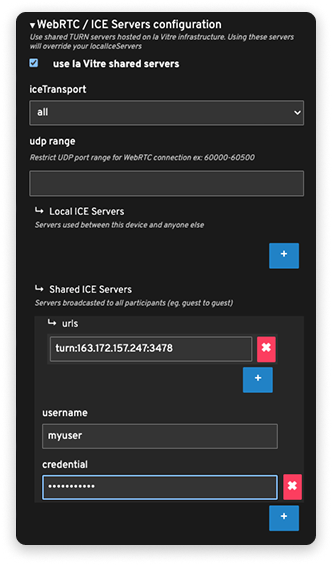
In the Advanced Parameters is a WebRTC/ICE Servers section.
Uncheck "use la Vitre shared servers", Remove any existing entries and Add your information.
If you put the information inside the Shared Ice Servers, the remote Vitre or Guest that will try to connect to your Vitre will receive those informations.
If you put them inside Local Ice Servers, the remote participant will need to have it's own Ice servers configured
✨ Missing information?
This Help Center evolves with your needs.Let us know which terms, features, or use cases should be clarified, or contact support for personalized assistance.
Bringing you closer to what matters. We are enriching this resource together.