Presence
The Presence setting allows la Vitre to sense if someone is actually in front of the screen.
It then adjusts its behavior to respect the room's rhythm: active when there are faces, more discreet when the room is empty.
Most values are already set by default. You'll only need to modify them for specific needs.
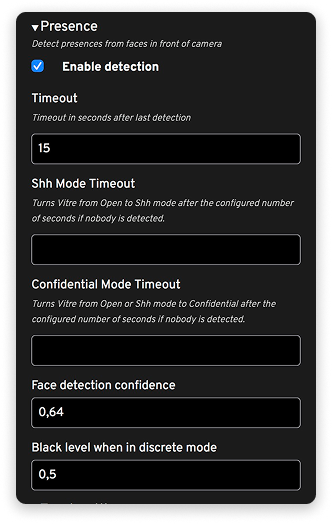
Enable detection: Activates presence detection from faces seen by the camera.
Enabling this setting will display a smiley at the top of your screen if one or more faces are detected.
Timeout: Time (in seconds) before la Vitre considers that no one is in front of the screen after the last detection.
Switch to discreet and confidential mode
Shh Mode Timeout: Time after which la Vitre switches to Shush mode if no presence is detected. The microphone is then muted, only video remains active, a message is displayed on the screen.
Confidential Mode Timeout: Time after which la Vitre switches to Confidential mode if the room remains empty and no face is detected. This mode further protects what's displayed on the screen when no one is there to watch; the microphone is muted, the video is blurred.
The default values already suit most rooms; you can adjust them if you want la Vitre to step back sooner or later.
Detection sensitivity
Face detection confidence: Defines the confidence level required for la Vitre to consider that a face is actually present.
A higher level makes detection stricter (fewer false positives), a lower level makes it more sensitive (easier detection in difficult lighting conditions).
This setting is already calibrated; you only adjust it if detections are too frequent or, conversely, too rare.
Brightness in discreet mode
Black level when in discrete mode: Adjustment of the black level/screen brightness when la Vitre goes into discreet mode and no face is detected.
The idea is to keep a present screen, but softer.
✨ Missing information?
This Help Center evolves with your needs.Let us know which terms, features, or use cases should be clarified, or contact support for personalized assistance.
Bringing you closer to what matters. We are enriching this resource together.