Speaker mode
✨ Speaker mode allows you to invite someone to appear in full size in la Vitre, even without la Vitre on their side.
Ideal for a conference, a remote presentation, or a VIP moment when travel is not possible.
Before you start
- Recommended device: smartphone or tablet in vertical format, with front camera and microphone in good condition.
- Stability: use a tripod or stable support.
- Lens: make sure it is clear and clean.
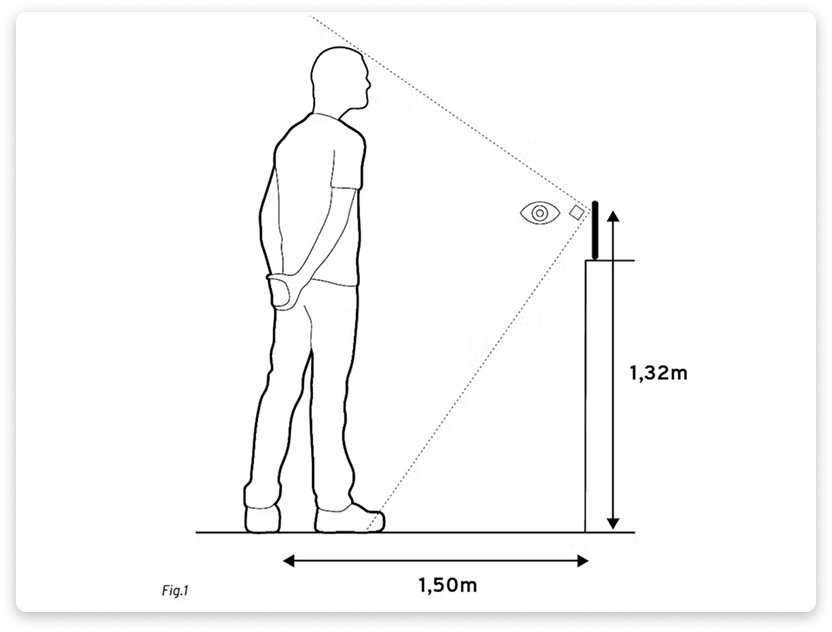
- Height: place the lens at 1.32 m from the ground. Keep the device straight and perpendicular.
- Network: reliable Wi‑Fi or good quality 4G/5G.
- Audio: prefer wireless headphones for clear voice.
-
Guest link: share the guest link of your Vitre from the Companion.
Steps for the guest
- Open the invitation link and authorize the camera and microphone.
- Enter your name to be identified.
- In the "V" menu, choose the front camera to keep your gaze towards your interlocutors.
- Placement: stand about 1.5 m from the camera, well centered.
- Lighting: avoid backlighting. Prefer a light facing you or slightly from the side.
Adjust the display on la Vitre
- Open the "three dots" menu on la Vitre, scroll down to the version number and tap three times to access the advanced menu.
- Select "Open stream size", then adjust the zoom and position using the blue bar at the top while moving the image. Validate.
- Goal: the invited person should appear in full size. Neither too big nor too small.
For more details, see this page: Adjust video display
End of session
Close the browser on the guest side. Reset the standard display on la Vitre.
✨ Missing information?
This Help Center evolves with your needs.Let us know which terms, features, or use cases should be clarified, or contact support for personalized assistance.
Bringing you closer to what matters. We are enriching this resource together.