Install microphone drivers
✨ These audio drivers optimize the detection and quality of your microphone on la Vitre. A simple installation in just a few clicks to ensure smooth communication.
When to install these drivers?
Our support team or your IT department may ask you to install these drivers in certain situations:
- After a Windows update that has modified audio settings
- In case of microphone detection issues
- To optimize the audio quality of la Vitre
Step-by-step installation
- Download the installation file: lavit.re/drivers-mic
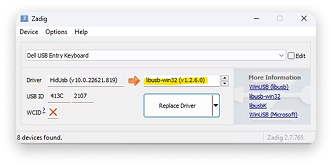
- Open the downloaded zadig.exe file
- Select libusb32 from the dropdown list
- In the Options menu, check List All Devices.
- From the main dropdown list, select only the la Vitre microphone.
- Click Install Driver
- Restart the la Vitre application once the installation is complete
✨ Missing information?
This Help Center evolves with your needs.Let us know which terms, features, or use cases should be clarified, or contact support for personalized assistance.
Bringing you closer to what matters. We are enriching this resource together.