Video
The Video setting mainly manages how the camera shows you to other Vitres.
In most installations, everything is configured automatically. You simply verify that the correct camera is being used. This is also the first step for setting up an additional camera on your Vitre.
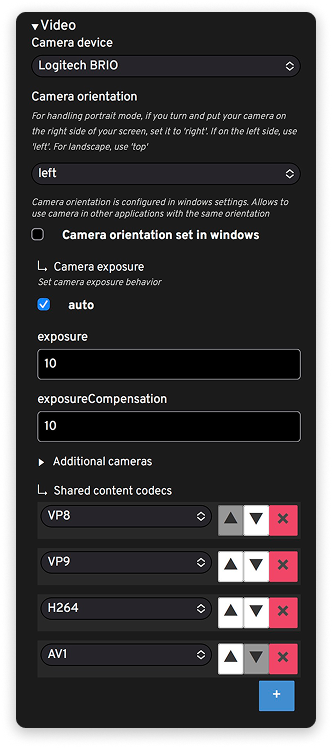
Camera device: displays the camera detected by la Vitre (for example Logitech BRIO).
Camera orientation: defines the camera orientation. For portrait mode, if the camera is on the right side of your screen, set to "right"; on the left side, set to "left". For landscape mode, set to "top".
Camera orientation set in windows: when this option is enabled, the camera orientation follows what's defined in Windows.
Image exposure
Under Camera exposure, you adjust the image light.
auto: lets la Vitre automatically manage exposure based on room lighting. This is the recommended choice in most cases.
exposure / exposureCompensation: allow you to manually correct brightness if needed: for example, slightly brighten a face when the room is dark, or prevent a very bright background from making you disappear in the image.
These settings should be used with caution. A simple test with someone remotely is enough to verify that the face remains clearly visible, without blown-out areas or areas that are too dark.
Additional cameras
The Additional cameras section is used when you add a second camera:
for example an overview of the room, a closer shot of the speaker, or a specific view for an event.
Find the steps on this page in our help center: Add a camera.
Video sharing: content codecs
Shared content codecs (VP8, VP9, H264, AV1, etc.): they define the formats used to send video of shared content.
The order and choice of these codecs are preconfigured to work on most networks. You normally don't need to modify them, unless specifically instructed by your IT team. Our technical team will be available for any advice.
✨ Missing information?
This Help Center evolves with your needs.Let us know which terms, features, or use cases should be clarified, or contact support for personalized assistance.
Bringing you closer to what matters. We are enriching this resource together.