The built-in connection test
✨ Test your internet connection speed directly from la Vitre screen.
Minimum requirements
la Vitre needs at least 5 Mbps downstream and 5 Mbps upstream to work properly.
Run the test
In the "three dots" menu of la Vitre, you can launch a connection speed test. It measures the speed and quality of your Internet access.
The test window opens only on la Vitre that launched the test, which is why it has a white label.
You can change the language with the top right menu.
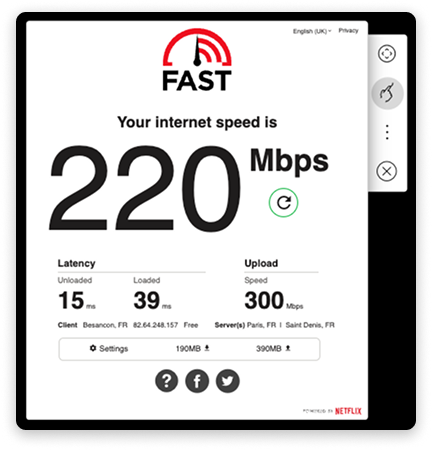
How to read the test result?
- Downstream speed: here 220 Mbps. You receive data, for example video.
- Upstream speed: here 300 Mbps. You send your data.
- Latency: here 39 ms. Above 50 ms, the connection quality degrades.
In this example, everything is fine. The experience is smooth.
What to do if it's not optimal?
- Restart the Internet box.
- Try another network or plug in an Ethernet cable.
- Contact your administrator or our team. We'll guide you step by step.
For more information, also check the complete help page: Check and change network
✨ Missing information?
This Help Center evolves with your needs.Let us know which terms, features, or use cases should be clarified, or contact support for personalized assistance.
Bringing you closer to what matters. We are enriching this resource together.