WebRTC / ICE Servers configuration
The WebRTC / ICE Servers configuration setting concerns how la Vitre connects to other Vitres through your company's network (ports, intermediate servers, etc.).
It directly impacts the quality and stability of conversations, but remains entirely on the "network layer" side.
In normal use, you don't need to modify anything here.
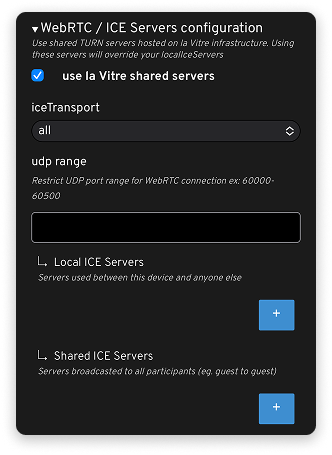
Use la Vitre shared servers
Use la Vitre shared servers: When this option is enabled, la Vitre uses the shared servers provided by la Vitre infrastructure.
This is the recommended configuration: it simplifies exchanges between sites without requiring advanced daily settings.
Transports and network ports (for IT)
The following fields are intended for network teams:
IceTransport: Defines the transport types used to establish the connection.
Udp range: Allows you to restrict the UDP port range used by WebRTC.
Local ICE Servers / Shared ICE Servers: Used to declare specific servers (STUN / TURN…) used by la Vitre, locally or shared among multiple participants.
These settings must be aligned with the company's security policy and network configuration.
Usage recommendation
For everything related to WebRTC / ICE Servers:
- if la Vitre is working correctly, don't change anything;
- if you encounter blockages or network problems, simply put your IT team and la Vitre technical service in touch to analyze the situation and, if needed, adjust these values together.
In other words: these settings are there to allow fine integration in complex network environments, but they're not designed to be modified directly by users or non-technical administrators.
✨ Missing information?
This Help Center evolves with your needs.Let us know which terms, features, or use cases should be clarified, or contact support for personalized assistance.
Bringing you closer to what matters. We are enriching this resource together.