Logs
The Logs setting concerns how la Vitre records what happens "behind the scenes":
technical events useful for understanding an incident or analyzing unusual behavior.
For daily use, you don't need to touch it.
Logs are mainly used by support and technical teams.
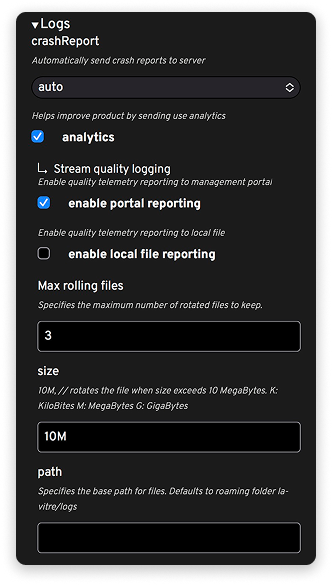
What are logs for?
Logs allow you to:
- trace what happened just before a problem (communication cutting out, Vitre not responding, network difficulty…);
- verify the proper completion of certain actions (connection to a server, update, service startup);
- share specific elements with la Vitre support or the client's IT.
They don't contain the content of exchanges, but technical information about how la Vitre operates.
When to view or export logs?
You'll mainly need this section in two cases:
- in case of repeated incident, when support asks you to enable or export logs;
- in highly controlled environments, where IT wants to closely monitor device behavior.
Recommendation
Outside of direct contact with la Vitre technical service or with your IT teams,
the best option is to leave Logs settings as they are.
If a problem appears, the simple reflex is:
- note the date, time, and what you were doing;
- contact support;
- follow, if needed, the instructions you'll be given to enable or share logs.
The goal is for you to focus on exchanges, voices, and eye contact,
and leave detailed log analysis to those who really need it.
✨ Missing information?
This Help Center evolves with your needs.Let us know which terms, features, or use cases should be clarified, or contact support for personalized assistance.
Bringing you closer to what matters. We are enriching this resource together.