Check your licences
✨ The Licenses screen lists the team's licences and says how long they are valid. It is where you check whether a renewal is coming up.
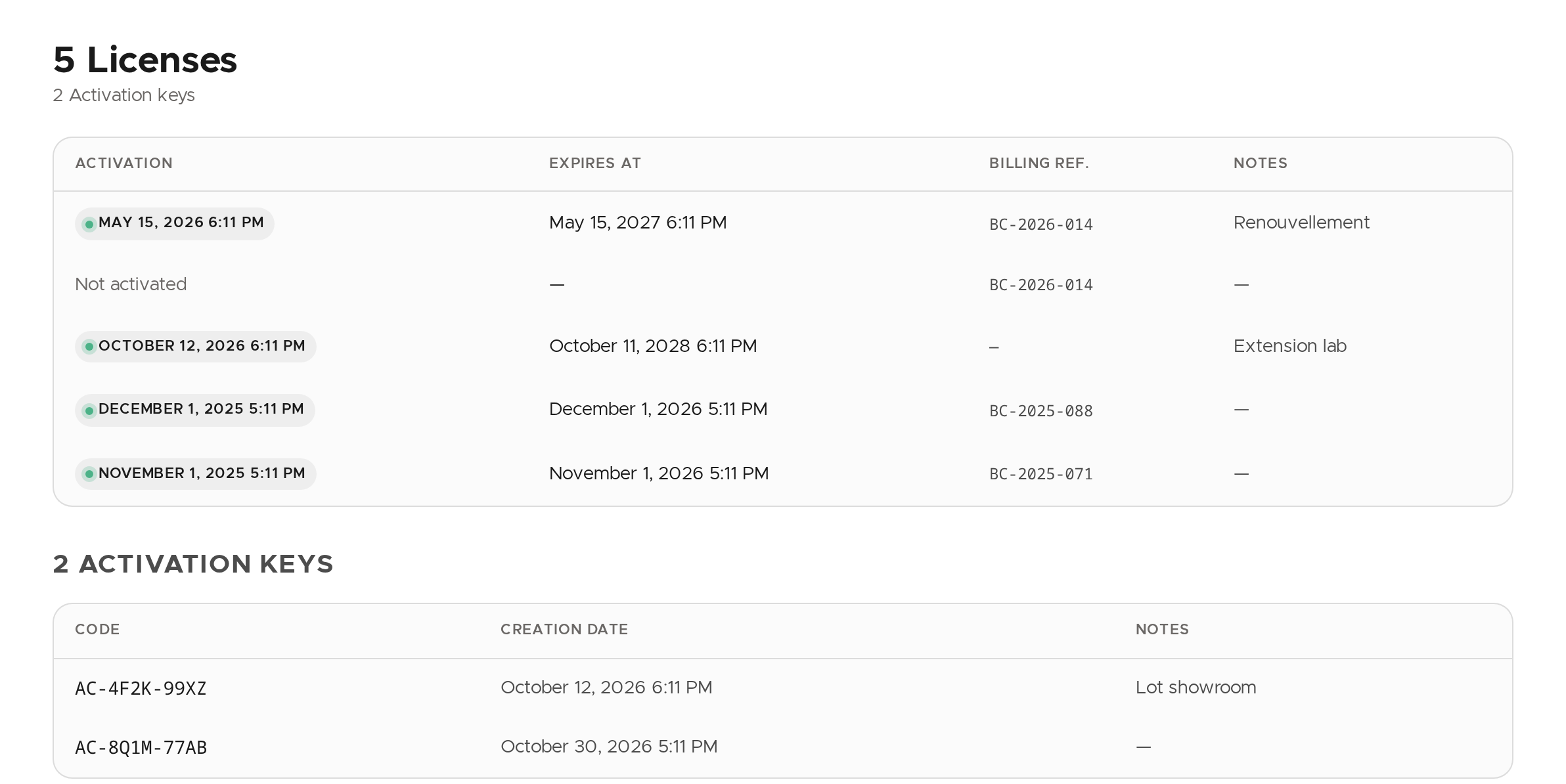
Read a licence
Each row is a licence:
- Activation: the date the licence was activated on a Vitre. Not activated means it is available and not tied to any Vitre.
- Expires at: the end of validity, empty until the licence is activated.
- Billing Ref. and Notes: the references entered when the licence was created, to tie it to an order.
The green dot before the activation date does not mean the licence is still valid: look at Expires at.
Activation keys
Below the licences, the team's activation keys are listed: their Code, creation date and notes.
💡 Licences are added and edited by la Vitre support: to add one or fix a date, contact them. Creating and deleting activation keys is also reserved to a specific right (
Vitres.Provision) that the administrator role does not include.✨ Missing information?
This Help Center evolves with your needs.Let us know which terms, features, or use cases should be clarified, or contact support for personalized assistance.
Bringing you closer to what matters. We are enriching this resource together.