Simplified kiosk mode
✨ Kiosk mode is a Windows feature that secures a device by preventing users from accessing the operating system, files, or other applications. This ensures, for example, that only la Vitre's application remains permanently visible on the screen.
Since version 1.22.0-mainX64.6158, it is possible to directly activate an option related to kiosk mode from la Vitre's advanced settings.
To access it: Security parameters > Check the Enable kiosk mode option.
This option prevents la Vitre application window from being minimized when it is open, to ensure a continuous display experience.
It has no other impact on the general behavior of the application or Windows.
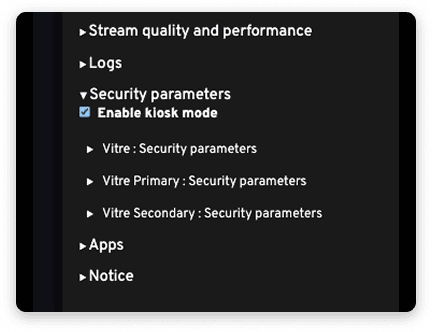
Important: this checkbox does not replace the full kiosk mode configured by PowerShell script available on this page in our help center: Deployment, kiosk mode and updates.
The script remains the reference method for a complete deployment of kiosk mode on Windows, including system protection and automatic application launch.
✨ Missing information?
This Help Center evolves with your needs.Let us know which terms, features, or use cases should be clarified, or contact support for personalized assistance.
Bringing you closer to what matters. We are enriching this resource together.