Identity Providers
✨ la Vitre offers several ways for the people in your team to sign in to the Companion application, to a Vitre, and to the administration portal.
Out of the box, with nothing to configure:
- Microsoft account, personal or corporate
- Google account
- Apple account
- A magic link sent to the user's e-mail address
If your organisation runs its own directory, you can connect it instead. See Custom Identity Provider below.
Note for corporate Microsoft accounts
The first sign-in from a corporate Microsoft account may need the consent of a directory administrator. An administrator can grant it once, for the whole tenant: grant admin consent to la Vitre.
Custom Identity Provider
A Custom Identity Provider connects your own OpenID Connect directory to la Vitre. It is bound to your team's e-mail domains: whoever enters an address on one of those domains is sent to your directory instead of the built-in buttons.
The domains themselves are declared by la Vitre — contact support to have yours added. The provider is yours to configure, on your team page in the administration portal, under Identity Providers.
In your OpenID Connect application, declare exactly this redirect URI:
https://svc.lavit.re/oauth/complete
la Vitre always completes the sign-in on its own server, so this is the only address your directory ever needs to know — whichever application the person started from.
Then declare the provider in the portal. Each field maps to a value from your OpenID Connect application:
- Name — the label shown on the la Vitre sign-in screen.
- Discovery URL — the address of your directory's OpenID Connect discovery document. Give it and la Vitre reads the endpoints and the signing keys from it, so nothing else has to be kept in sync.
- Issuer — optional when a Discovery URL is provided.
- Client Id — the application identifier issued by your directory.
- Client secret — leave it empty for a public client. Fill it in when your directory requires the application to authenticate at its token endpoint.
- OAuth flow (response_type) — choose Authorization Code + PKCE whenever your directory supports it, which is what the example below does. Automatic keeps the older implicit flow, for a directory that only advertises
id_token. - Roles claim — optional, and empty by default. See User management below.
- Require this provider — see below.
The walkthrough that follows uses Microsoft Entra ID as an example. Replace every value with the one from your own application.
Sample configuration for Microsoft Entra Application
Create a new App registration https://portal.azure.com/#view/Microsoft_AAD_RegisteredApps/CreateApplicationBlade/quickStartType~/null/isMSAApp~/false
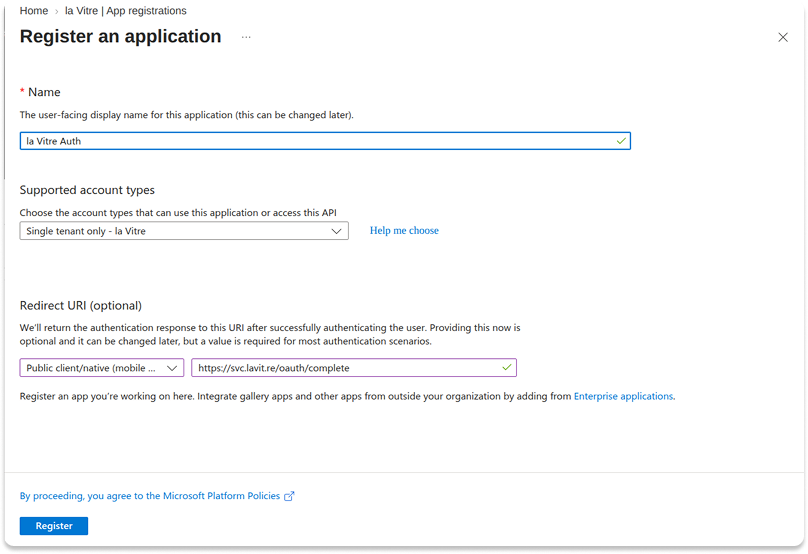
Give it any name — that one is only seen in Azure — keep Supported account types on your single tenant, and declare the redirect URI as Public client/native (mobile & desktop). Registered that way the application needs no client secret: la Vitre completes the sign-in with PKCE alone.
The redirect URL to declare is https://svc.lavit.re/oauth/complete
Its Overview blade gives you the values to copy:
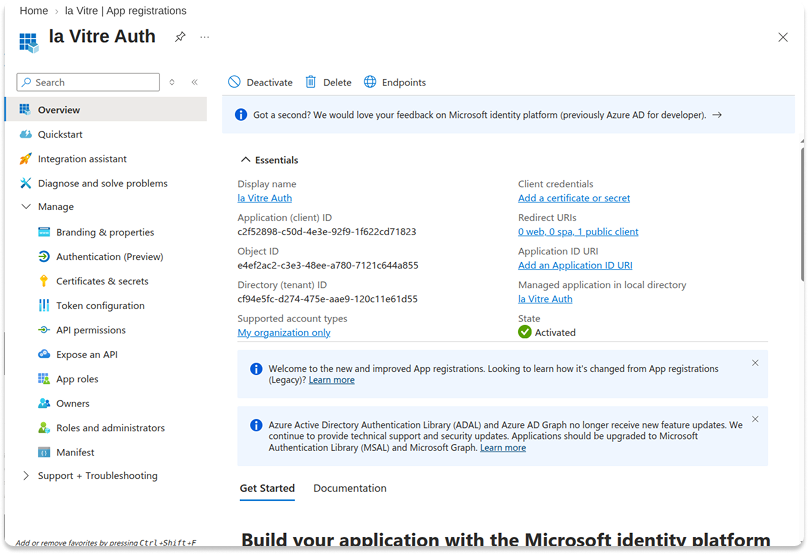
Name — free text, shown on the la Vitre sign-in screen.
Client Id — the Application (client) ID, here c2f52898-c50d-4e3e-92f9-1f622cd71823.
Issuer — left empty: the discovery document provides it.
Discovery URL — use the v2.0 endpoint, https://login.microsoftonline.com/{TenantId}/v2.0/.well-known/openid-configuration?appid={ClientId}, so here https://login.microsoftonline.com/cf94e5fc-d274-475e-aae9-120c11e61d55/v2.0/.well-known/openid-configuration?appid=c2f52898-c50d-4e3e-92f9-1f622cd71823. The Directory (tenant) ID sits on the same Overview blade, next to the client id. The portal shows the same pattern under the field.
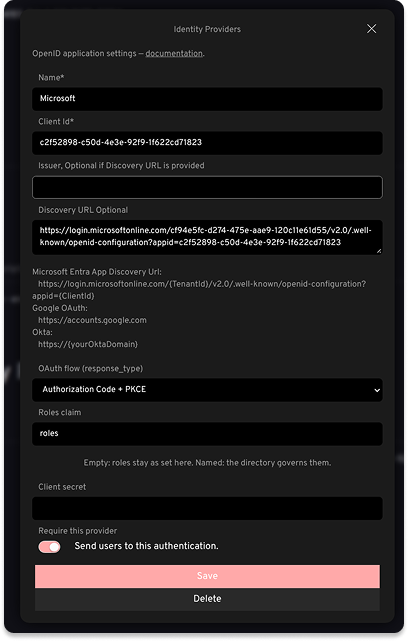
Fill in the fields in the administration portal. The registration being a public client, set OAuth flow to Authorization Code + PKCE and leave Client secret empty:
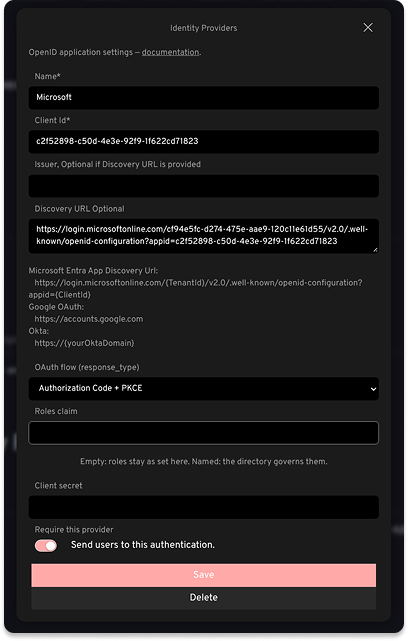
Require this provider decides how strict the binding is. Left off, your directory is simply what people from your domains are offered. Turned on — the toggle then reads Send users to this authentication — it becomes the only way into your team: signing in through a built-in provider or a magic link no longer opens it.
User management
The administrator role is what opens the administration portal. You assign it by hand, on the Users page of the portal.
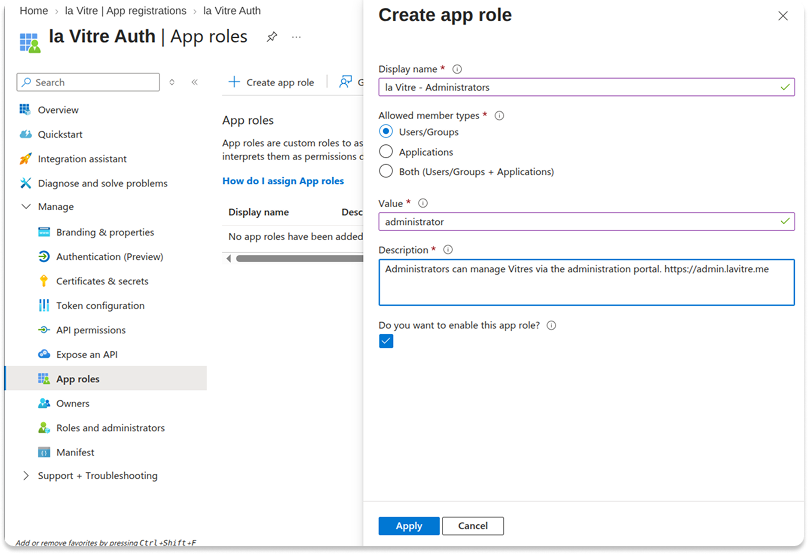
You can also let your own directory decide who holds it. In your Entra app registration, under App roles, create a role:
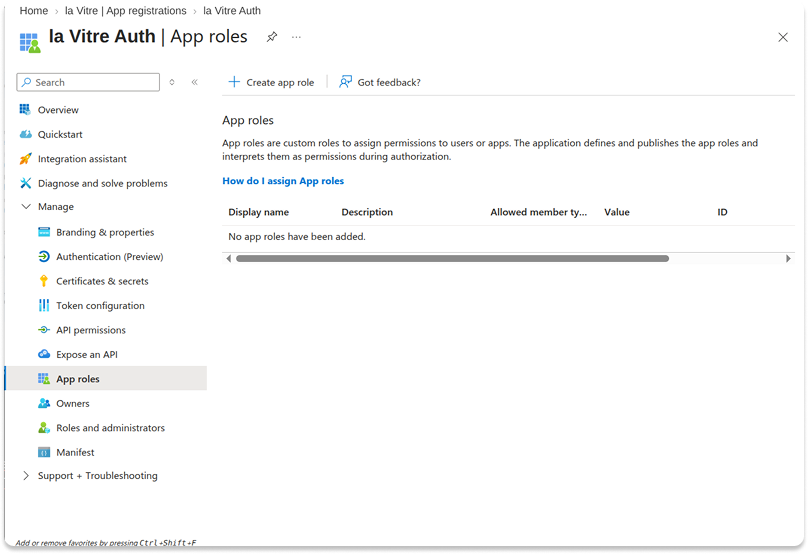
Set Allowed member types to Users/Groups, and Value to exactly administrator: that string is the name of the la Vitre role, and it is what the token will carry. The display name is yours to choose — it never leaves Azure.
Then, on the provider you declared in the portal, set Roles claim to roles — the claim Entra uses to carry app roles. An Okta directory carries them in groups instead.
From then on your directory governs the roles, and it does so at every sign-in: whoever the token names administrator becomes one here, and whoever loses the assignment on your side loses the role here too, on their next sign-in.
Two details are worth knowing. A token that carries no roles claim at all changes nothing, so a mistyped claim name cannot strip everyone of their rights. And leaving Roles claim empty — the default — keeps the roles exactly as set in the portal.
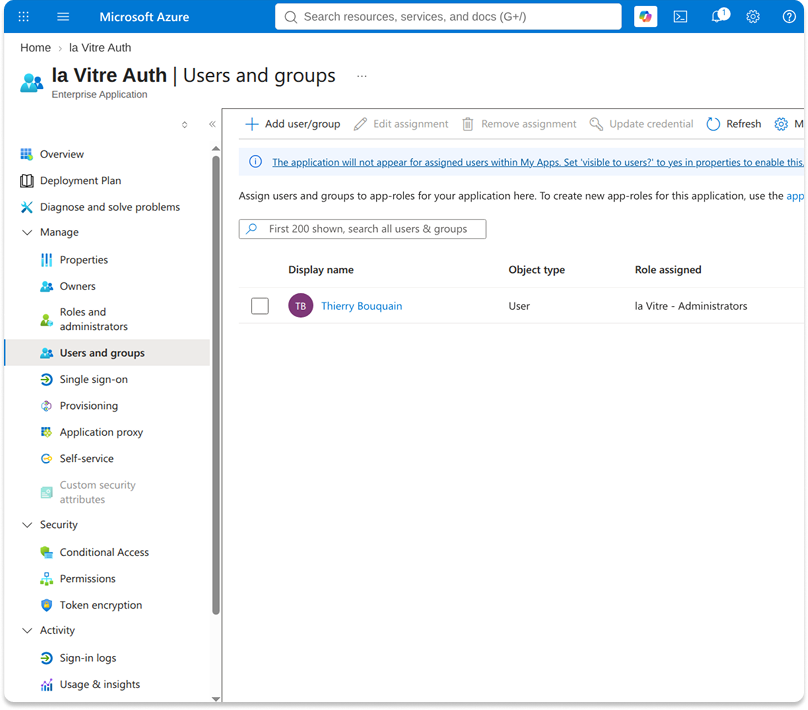
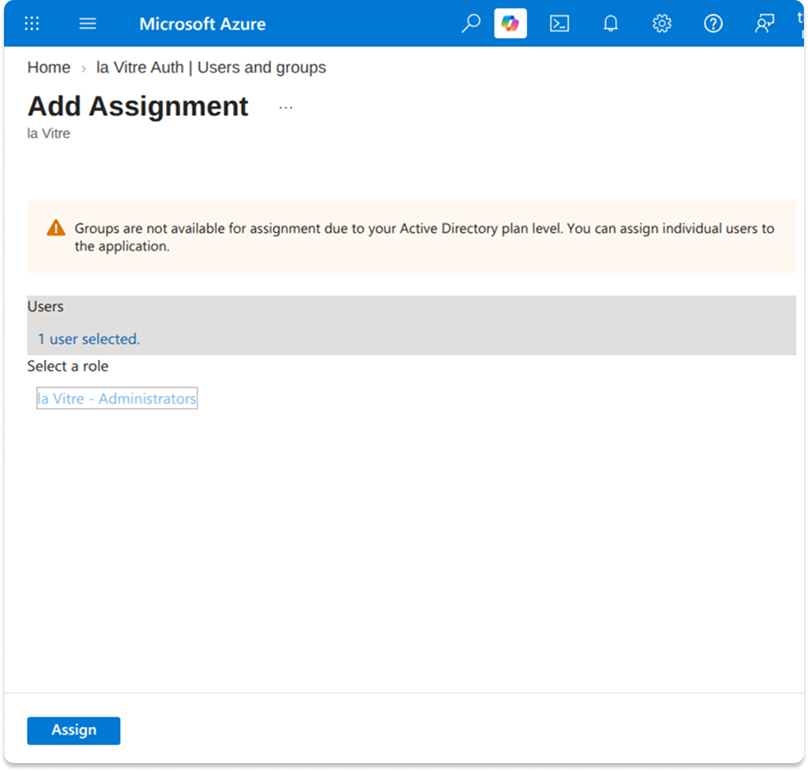
To hand the role out, open the Enterprise application matching your app registration, go to Users and groups, and assign your people to it. Assigning whole groups needs an Entra ID P1 or P2 plan; without one, Azure only lets you add users one by one.
What la Vitre expects from your directory
Any OpenID Connect provider works, as long as its discovery document says the following. la Vitre checks this when you save the provider, so a mismatch surfaces there rather than on someone's first sign-in.
- The Discovery URL answers over public HTTPS. Private, loopback and link-local addresses are refused, on the discovery document and on every endpoint it points to.
- The document advertises the
openidscope and ajwks_uri. - It supports the
form_postresponse mode. la Vitre receives the result as a form post onhttps://svc.lavit.re/oauth/complete. - It supports the
id_tokenresponse type, orcodewhen you choose Authorization Code + PKCE — which also needs a token endpoint. - The token it issues carries the person's e-mail address. la Vitre asks for the
openid,email,profileandnamescopes, and refuses a token with no e-mail in it.
✨ Missing information?
This Help Center evolves with your needs.Let us know which terms, features, or use cases should be clarified, or contact support for personalized assistance.
Bringing you closer to what matters. We are enriching this resource together.