Auto update
The Auto update setting manages how la Vitre updates itself.
In the vast majority of cases, updates are automatic and already enabled.
la Vitre simply restarts when Windows or the application needs it, often outside usage times.
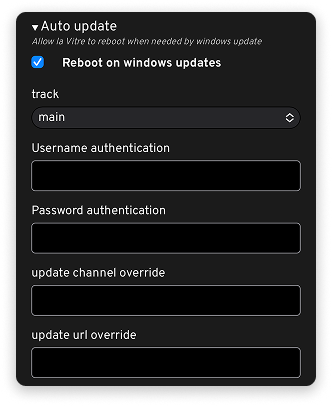
Default behavior
Reboot on windows updates: Allows la Vitre to restart when Windows applies a necessary update. This keeps la Vitre up to date, stable, and secure, without manual intervention.
Track: Indicates the update "branch" used ("Main" by default, "Custom" if you want to customize).
In a standard fleet, you don't need to change anything: updates run their course and la Vitre updates itself, when it restarts.
Settings reserved for highly controlled environments
The following fields only concern remotely managed and highly supervised IT fleets when you choose the "Custom" setting in Track:
Username authentication / Password authentication: Used when an internal update server requires authentication.
Update channel override / update url override: Allow you to force an update channel or a specific address (for example to point to an infrastructure managed by the client's IT).
These settings should only be modified as part of a specific project, in direct contact between la Vitre technical service and the client's IT team.
Recommendation
- Standard use: leave Auto update as is, with automatic restart enabled.
- Highly controlled fleet: don't touch these fields alone. If needed, we'll simply put your IT and our technical team in touch to define the right update strategy together.
✨ Missing information?
This Help Center evolves with your needs.Let us know which terms, features, or use cases should be clarified, or contact support for personalized assistance.
Bringing you closer to what matters. We are enriching this resource together.