Getting started in 3 steps
✨ Your la Vitre is unpacked. Everything you need to know to install your la Vitre and succeed with your first exchange step by step in under 10 minutes.
Come closer — it changes everything.
Step 1: Positioning.
Choose a spot that’s great for conversations:
- Clear space: 2 to 3 meters in front of the screen so you can move around.
- Soft lighting: avoid backlighting.
- Simple background: a neutral wall highlights the person you’re speaking with.
- Power outlet nearby: accessible power.
- Stable Ethernet or Wi‑Fi connection.
For detailed advice on the best setup, see Tips for placing la Vitre.
Step 2: Connections.
-
Power.
Plug the single cable into a standard outlet. The equipment is preconfigured.
-
Internet.
Connect the RJ45 cable for a stable connection. 5 Mb/s is enough. A Wi‑Fi or 5G connection also works.
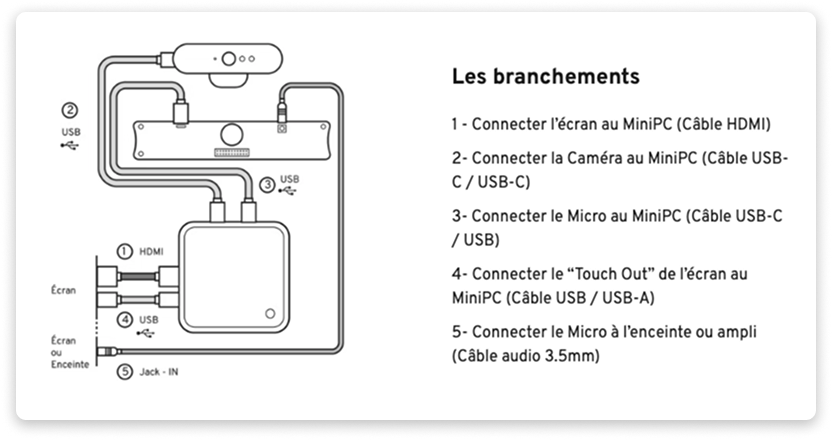
Step 3: First start.
- Turn on the mini‑PC with the button located behind the screen.
- Wait: the app starts automatically.
- If needed, test network connectivity with The built-in connection test or Check and change network.
Installation complete!
Your la Vitre is ready.
It’s that simple.
Your first exchange.
Optimal positioning.
Stand 1.50 to 2 meters from your la Vitre so you’re perfectly visible to the people you’re speaking with.
Start an exchange.
- Knock using the hand icon on the screen.
- Wait for your contact to answer.
- Talk naturally, as if you were face to face.
All that’s left is to discover the basic features to get comfortable with your la Vitre on this page: Interface and Features.
Additional resources:
- FAQ First installation: checks and answers to common issues.
- Check and change network: switch from Wi‑Fi to Ethernet.
- Technical information: network requirements, URLs to whitelist.
- Deployment, kiosk mode and updates: for enterprise rollouts.
✨ Missing information?
This Help Center evolves with your needs.Let us know which terms, features, or use cases should be clarified, or contact support for personalized assistance.
Bringing you closer to what matters. We are enriching this resource together.