Adjust video display
✨ Between two 86" la Vitre units, the application automatically adjusts video streams so you can see your caller at life size.
In most cases, you don't need to do anything.However, you can manually resize the image if you're using a different screen size or if your caller is in Speaker mode
Resize video streams
- On la Vitre, open the "three dots" menu.
- Scroll down to the version number and tap it three times to open the advanced menu.
- Select "Open stream size".
- A blue bar appears at the top of the screen. Move the slider to zoom in or out.
- Move the image to center it properly. Adjust until the person appears at life size, neither too big nor too small.
On-screen controls
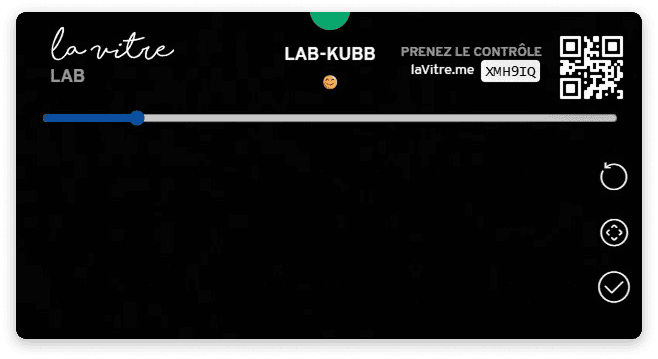
The blue bar with the slider to move.
The controls on the right:
- Top icon: reset video stream
- Middle icon: automatically adjust video stream
- Bottom icon: validate changes
✨ Missing information?
This Help Center evolves with your needs.Let us know which terms, features, or use cases should be clarified, or contact support for personalized assistance.
Bringing you closer to what matters. We are enriching this resource together.