Ephemeral spaces
✨ An ephemeral space is a private and temporary place to talk separately, face-to-face or in a small group. You isolate yourself with one or more Vitres to preserve confidentiality and the quality of the exchange.
It's useful when several Vitres are connected in the same space and you want to meet elsewhere, as for a one-on-one conversation.
Create an ephemeral space for a one-time meeting
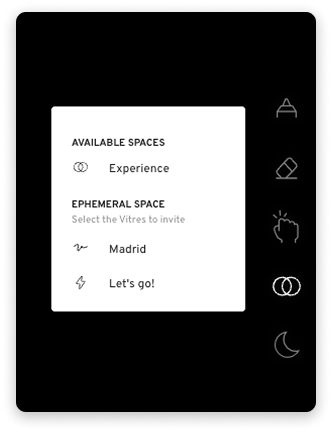
- Agree with your contact to isolate yourselves. Simply say for example: "Let's meet in another space."
- On your Vitre, touch the two circles icon.
- Choose your contact's Vitre from the list of ephemeral spaces, for example "Madrid".
- Confirm with "Let's go!".
-
You are redirected to a private space. Your contact receives a notification on their Vitre and accepts it. You can invite several Vitres to join this space.
Invite other participants
During the exchange, you can bring in other people.
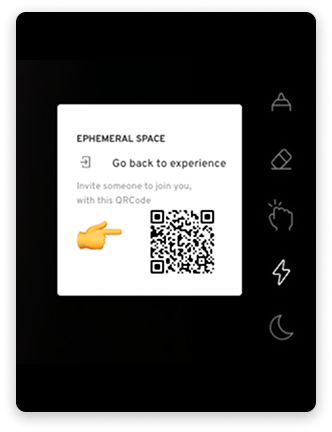
- Touch the lightning icon.
- Scan the QR code that opens the unique link to this space.
-
Share this link with your colleagues and guests via SMS, WhatsApp or email for example.
Return to the common space
- At the end of the meeting, touch the lightning icon.
- Select "Return to [Your space name]" to return to your usual space.
- Your contact does the same action on their Vitre.
- The Vitres automatically rejoin the initial common space.
Useful visual cues
- The lightning icon on the right only appears in an ephemeral space.
- Classic space name, for example "Experience" → you are in the common space.
-
Space name in brackets, for example "[AUR-AUCB]" → you are in an ephemeral space, a private meeting is in progress.


Tip: Before an exchange, check the name at the top left to confirm that you are in the right space.
✨ Missing information?
This Help Center evolves with your needs.Let us know which terms, features, or use cases should be clarified, or contact support for personalized assistance.
Bringing you closer to what matters. We are enriching this resource together.