Microsoft SSO
✨ Configure Microsoft Single Sign-On (SSO) to simplify your teams' login.
What is Microsoft SSO?
Single Sign-On allows your employees to log in with their usual Microsoft credentials, without creating a new account.
Enable Microsoft SSO
Activation requires administrator rights on your Active Directory.
Steps to follow:
- Log in with an administrator account from your AD
- Click on the authorization link: Authorize Microsoft SSO
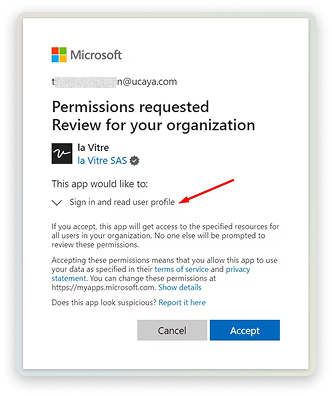
- Validate the requested permissions
What information is requested?
la Vitre only requests the following information:
- User profile: First name, Last name, Email
- Authentication: Ability to validate identity
No other data is collected or stored.
✨ Missing information?
This Help Center evolves with your needs.Let us know which terms, features, or use cases should be clarified, or contact support for personalized assistance.
Bringing you closer to what matters. We are enriching this resource together.